How I keep faces the same when editing photos with Nano Banana and GPT Image
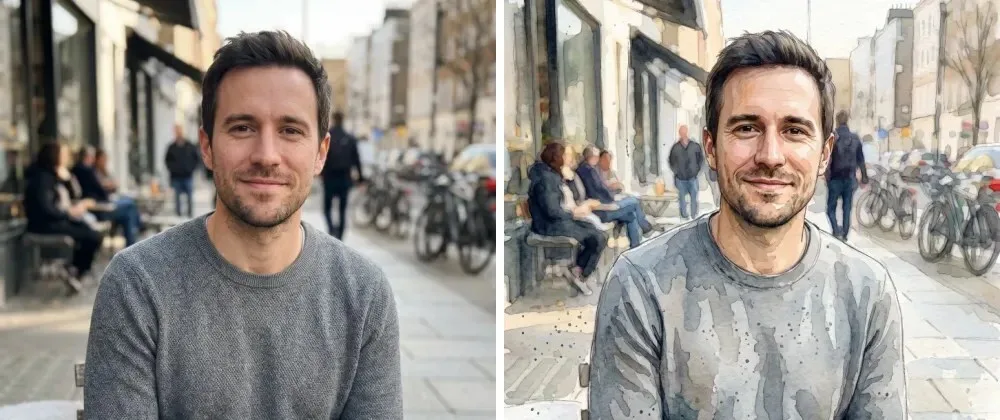
The most common complaint about AI photo editing is not quality. It's "that's not me anymore". You ask for a different jacket and get a diff...
Structured JSON Schema
Use with automated API pipelines, LangChain, or custom image generators
{
    "prompt": "The most common complaint about AI photo editing is not quality. It's \"that's not me anymore\". You ask for a different jacket and get a different person wearing it. I build [AI Photo Edit]( an AI photo editor where you upload a photo and type one sentence, like \"dress him in a navy suit\". It runs on two image models, 2.1 (Google) and GPT Image 2.5 (OpenAI). Both What fixed it was not a model or a face-swap step. It was one paragraph appended to every prompt, plus a check for edits that need more than one photo. Here is how that paragraph is built, the version that broke, and the edits that still don't work. > **TL;DR** Put a short paragraph of rules after the user's instruction. Protect identity, not appearance, and give every rule a way out for when the user asks for exactly what it protects. Then test it on the edits it might block. A copyable template and an eight-edit test list are below. ## Users write the change, the server writes the rules Users only type what they want changed. They never see the protective wording. The server adds it before the request goes to the model: ```ts // The user's sentence first, our rules after it. export function editPrompt(userPrompt: string): string { return `${()}\\n\\n${RULES}`; } ``` `RULES` is a short paragraph. I'm not going to paste our production wording, because it took a lot of test runs to get right, but each of its sentences has one job: 1. Apply the change above, and only that change. 2. Keep every person recognizable as themselves. 3. Leave everything the instruction doesn't mention where it was. 4. Say what happens when the user asks for a new art style. 5. Keep the original light and color unless the user asks otherwise. Here is a version you can copy. It is not our production text, and I haven't run it through my test set, so treat it as a starting point: ```text Edit request: {what the user typed} Rules for this edit: - Change only what the edit request asks for. People, objects, framing and background stay as they are. - Every person stays recognizable: same face shape, eyes, nose, mouth, skin tone and age. Their expression changes only if the request asks. - If the request asks for an art style (painting, cartoon, sketch), apply it to the whole image and keep each person recognizable in it. - Keep the original lighting, colors",
    "model": "Claude 3.7 / GPT-4o",
    "aspect_ratio": "1:1",
    "category": "Engineering & Strategy",
    "content_type": "text_prompt",
    "surface": "text_library",
    "quality_score": 82,
    "provenance": "COMMUNITY_PROMPT"
}
Voice Search & FAQs
Natural voice queries and direct answers for Siri, Google Assistant & Perplexity
"What is the best Engineering & Strategy prompt for Claude 3.7 / GPT-4o?"
The How I keep faces the same when editing photos with Nano Banana and GPT Image blueprint is optimized for Claude 3.7 / GPT-4o to produce high-precision output with verified JSON formatting.
"How do I prompt Claude 3.7 / GPT-4o for How I keep faces the same when editing photos with Nano Banana and GPT Image?"
Use the verified How I keep faces the same when editing photos with Nano Banana and GPT Image prompt from JsonPrompts.in. Copy the prompt or structured JSON blueprint and paste it directly into Claude 3.7 / GPT-4o.
"Where can I find free Claude 3.7 / GPT-4o prompt templates for Engineering & Strategy?"
JsonPrompts.in offers free verified Engineering & Strategy JSON prompt blueprints including How I keep faces the same when editing photos with Nano Banana and GPT Image, with zero sign-up required.